

What the order book is
The order book is a live list of buy and sell orders waiting in the market. It is often called the book or DOM.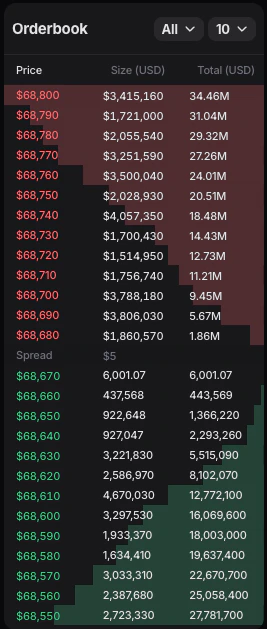
- the upper red side shows sell orders waiting above the market
- the lower green side shows buy orders waiting below the market
Where to find the order book in Entry Finance
In Entry Finance, the order book can be shown as a widget in the terminal layout.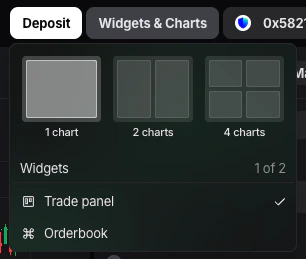
How to read the order book in Entry Finance
In the current Entry Finance interface, the order book shows:Priceis the level where orders are waiting. On the red side, these are prices where sellers are willing to sell. On the green side, these are prices where buyers are willing to buy. The closer the row is to the middle of the order book, the closer it is to the current market price.Size (USD)shows how much liquidity is sitting at that specific price level. If the size is large, it means there is more volume waiting there. If the size is small, price can move through that level more easily.Total (USD)shows the cumulative amount of liquidity on that side of the book up to that level. This helps you see not just one row, but how much stacked liquidity is sitting behind it. That is useful when you want to judge whether price is approaching a thin area or a heavier block of orders.Spreadis the gap between the best bid and the best ask. In simple terms:- the best bid is the highest active buy order
- the best ask is the lowest active sell order The smaller the spread, the tighter the market usually is. The larger the spread, the more room there is between buyers and sellers, which can make entries and exits less efficient.
What the red and green sides mean
- The red side is the ask side of the book. It shows sellers waiting to sell into buyers.
- The green side is the bid side of the book. It shows buyers waiting to buy from sellers.
What the order book can help you with
In Entry Finance, the order book is especially useful for:- judging whether the market is liquid or thin
- estimating how easily an order may fill
- spotting nearby liquidity clusters
- deciding whether to use a market order or wait with a limit order
- understanding where price may hesitate in the short term
What recent trades are
Recent Trades shows trades that have already happened.
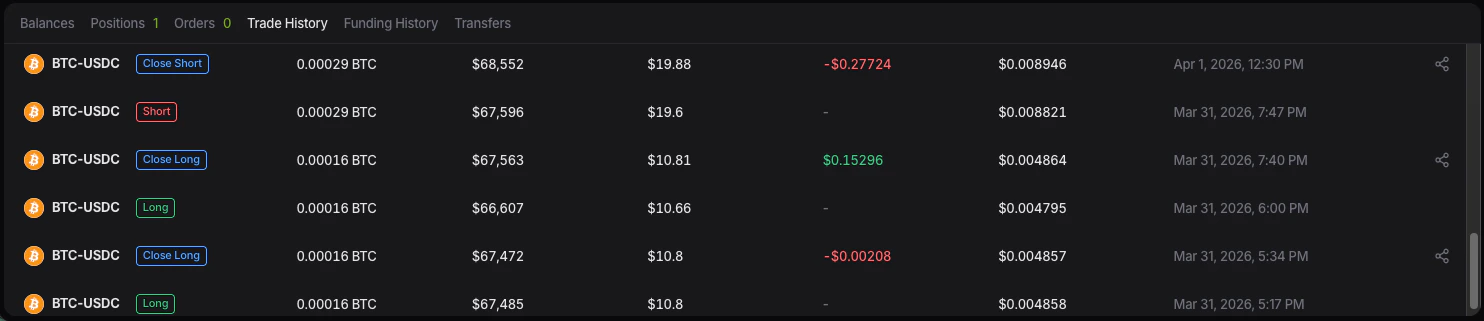
- the order book shows orders waiting in the market
- recent trades show orders that have already been matched and executed
What recent trades can help you with
Recent trades are useful for:- seeing whether the market is active right now
- spotting bursts of aggressive buying or selling
- checking whether a move is actually trading through the book
- confirming whether momentum is real or fading
How order book and recent trades are connected
They describe the same market, but from two different angles. The order book shows resting liquidity. Recent trades show what happens when active buyers or sellers hit that liquidity. For example:- if large sell liquidity is visible in the order book and recent trades keep hitting that side, you can see whether buyers are actually strong enough to absorb it
- if the order book looks thin and recent trades are aggressive, price may move quickly through nearby levels
- judging whether the market is liquid or thin
- estimating how easily an order may fill
- spotting nearby liquidity clusters
- deciding whether to use a market order or wait with a limit order
- understanding where price may hesitate in the short term
- seeing whether the market is active right now
- spotting bursts of aggressive buying or selling
- checking whether a move is actually trading through the book
- confirming whether momentum is real or fading