> ## Documentation Index
> Fetch the complete documentation index at: https://docs.entry.fi/llms.txt
> Use this file to discover all available pages before exploring further.
# Withdraw
Withdraw **USDC** from Entry Finance to an external wallet in a few steps.
In the current withdrawal flow, make sure you select the correct asset and network before confirming. The withdrawal screen also shows the available balance and minimum withdrawal amount.
## Withdraw funds
1. Click the account menu in the top-right corner of the terminal.
2. Select `Withdraw`.
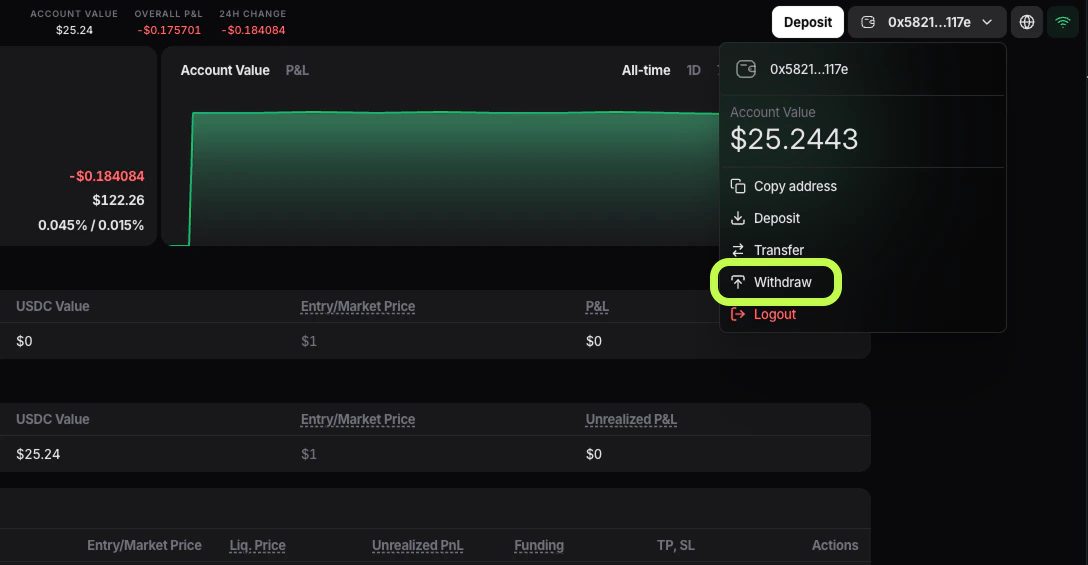 3. The `Withdraw Funds` window will open.
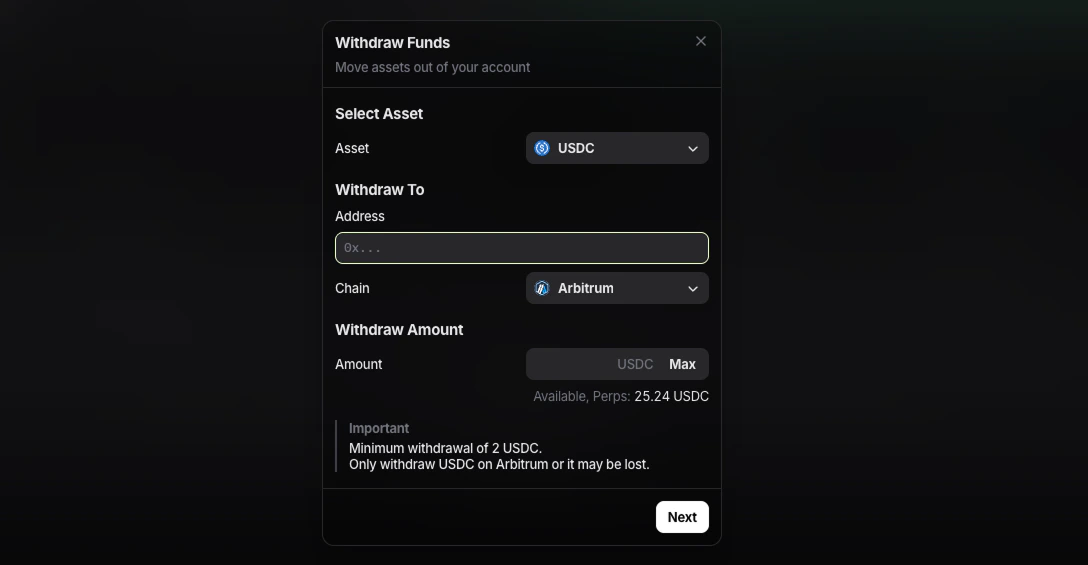 4. In the `Asset` field, choose the balance you want to withdraw from:
* `USDC` for the perpetuals balance
* **USDC \[Spot]** for the spot balance
5. Paste the destination wallet address into the `Address` field.
6. In `Chain`, select the network that matches the destination wallet or exchange deposit network. In the current interface, the available options are:
* `Arbitrum`
* `HyperEVM`
7. Enter the amount of `USDC` you want to withdraw. If you do not see the full balance available, part of it may currently be locked in active orders.
8. If you want to withdraw the full available balance, click `Max`.
9. Check the **Available** line under the amount field. This is the amount you can withdraw right now from the selected balance.
10. Click `Next`.
11. Review the withdrawal details and confirm the request.
After confirmation, wait for the withdrawal to be processed and then check the receiving wallet or exchange account.
Withdraw only `USDC` on the exact network selected in the withdrawal form. If the destination does not support that network, the funds may be lost.
The current withdrawal form shows a minimum withdrawal amount of `2 USDC`.
4. In the `Asset` field, choose the balance you want to withdraw from:
* `USDC` for the perpetuals balance
* **USDC \[Spot]** for the spot balance
5. Paste the destination wallet address into the `Address` field.
6. In `Chain`, select the network that matches the destination wallet or exchange deposit network. In the current interface, the available options are:
* `Arbitrum`
* `HyperEVM`
7. Enter the amount of `USDC` you want to withdraw. If you do not see the full balance available, part of it may currently be locked in active orders.
8. If you want to withdraw the full available balance, click `Max`.
9. Check the **Available** line under the amount field. This is the amount you can withdraw right now from the selected balance.
10. Click `Next`.
11. Review the withdrawal details and confirm the request.
After confirmation, wait for the withdrawal to be processed and then check the receiving wallet or exchange account.
Withdraw only `USDC` on the exact network selected in the withdrawal form. If the destination does not support that network, the funds may be lost.
The current withdrawal form shows a minimum withdrawal amount of `2 USDC`.