> ## Documentation Index
> Fetch the complete documentation index at: https://docs.entry.fi/llms.txt
> Use this file to discover all available pages before exploring further.
# Trading fees
Entry Finance shows trading fees directly in the terminal. The fees displayed in the interface already include the full trading commission for that trade type. In other words, the fee shown in the terminal is the fee the user should use when estimating execution costs.
## How fees are shown in Entry Finance
Fees are shown in the **Portfolio** area under:
* `Fees, Perps (Taker / Maker)`
You can click this area to open the fee details and the full fee schedule.
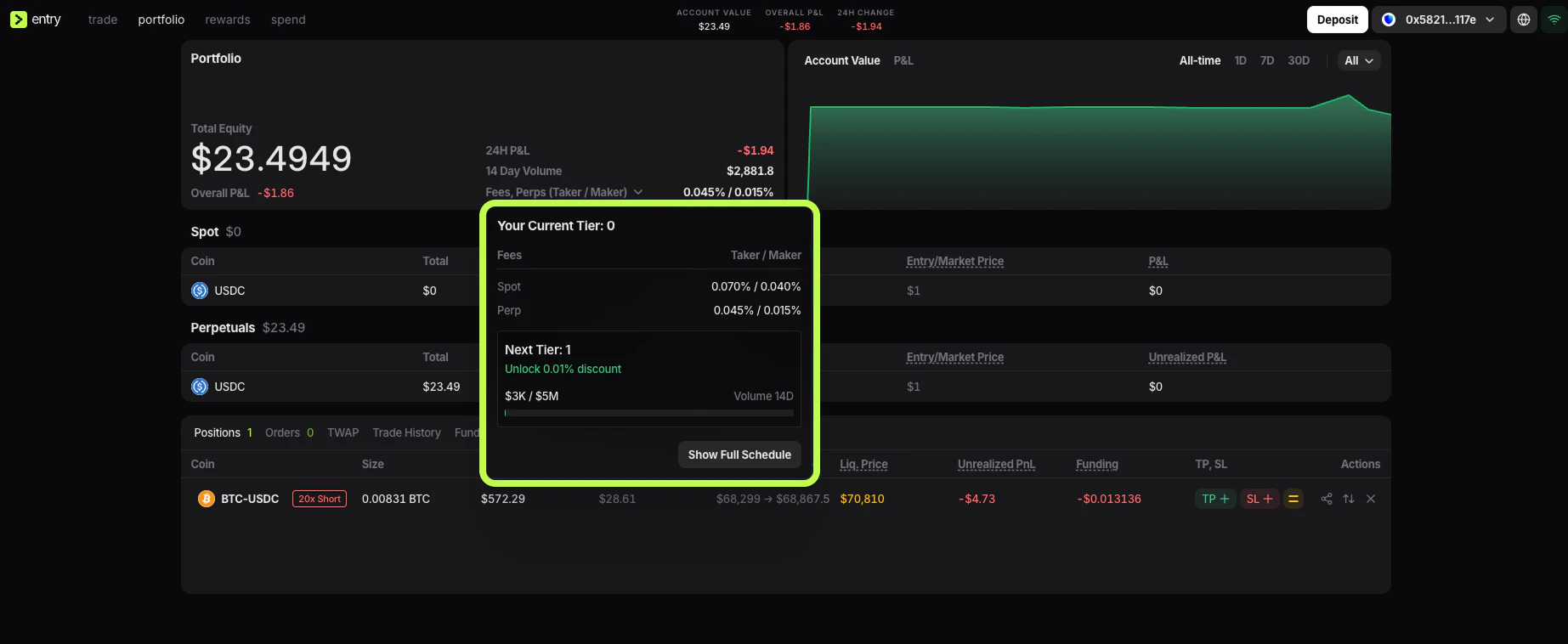 The fee popup shows:
* your current tier
* your current taker and maker rates
* the next tier
* the 14-day volume needed to unlock the next discount
From there, `Show Full Schedule` opens the complete fee table.
## Maker and taker fees
Entry Finance uses the standard maker / taker fee model.
### Taker
A `Taker` order removes liquidity from the market. This usually happens when you use a market order, or when your order executes immediately against liquidity already sitting in the book. Because taker orders consume existing liquidity, the taker fee is usually higher than the maker fee.
### Maker
A `Maker` order adds liquidity to the market. This usually happens when you place a limit order that rests in the order book and is filled later by someone else. Because maker orders add liquidity, the maker fee is usually lower.
## Perpetual fee tiers
* **Current Tier** is the fee level your account is currently using.
* **Next Tier** shows the next discount level you can unlock by increasing your trading volume over the last 14 days.
| Tier | 14D Volume | Taker | Maker |
| :--- | :----------------- | :------- | :------- |
| `0` | `<= $5,000,000` | `0.045%` | `0.015%` |
| `1` | `> $5,000,000` | `0.040%` | `0.012%` |
| `2` | `> $25,000,000` | `0.035%` | `0.008%` |
| `3` | `> $100,000,000` | `0.030%` | `0.004%` |
| `4` | `> $500,000,000` | `0.028%` | `0.000%` |
| `5` | `> $2,000,000,000` | `0.026%` | `0.000%` |
| `6` | `> $7,000,000,000` | `0.024%` | `0.000%` |
The fee popup shows:
* your current tier
* your current taker and maker rates
* the next tier
* the 14-day volume needed to unlock the next discount
From there, `Show Full Schedule` opens the complete fee table.
## Maker and taker fees
Entry Finance uses the standard maker / taker fee model.
### Taker
A `Taker` order removes liquidity from the market. This usually happens when you use a market order, or when your order executes immediately against liquidity already sitting in the book. Because taker orders consume existing liquidity, the taker fee is usually higher than the maker fee.
### Maker
A `Maker` order adds liquidity to the market. This usually happens when you place a limit order that rests in the order book and is filled later by someone else. Because maker orders add liquidity, the maker fee is usually lower.
## Perpetual fee tiers
* **Current Tier** is the fee level your account is currently using.
* **Next Tier** shows the next discount level you can unlock by increasing your trading volume over the last 14 days.
| Tier | 14D Volume | Taker | Maker |
| :--- | :----------------- | :------- | :------- |
| `0` | `<= $5,000,000` | `0.045%` | `0.015%` |
| `1` | `> $5,000,000` | `0.040%` | `0.012%` |
| `2` | `> $25,000,000` | `0.035%` | `0.008%` |
| `3` | `> $100,000,000` | `0.030%` | `0.004%` |
| `4` | `> $500,000,000` | `0.028%` | `0.000%` |
| `5` | `> $2,000,000,000` | `0.026%` | `0.000%` |
| `6` | `> $7,000,000,000` | `0.024%` | `0.000%` |